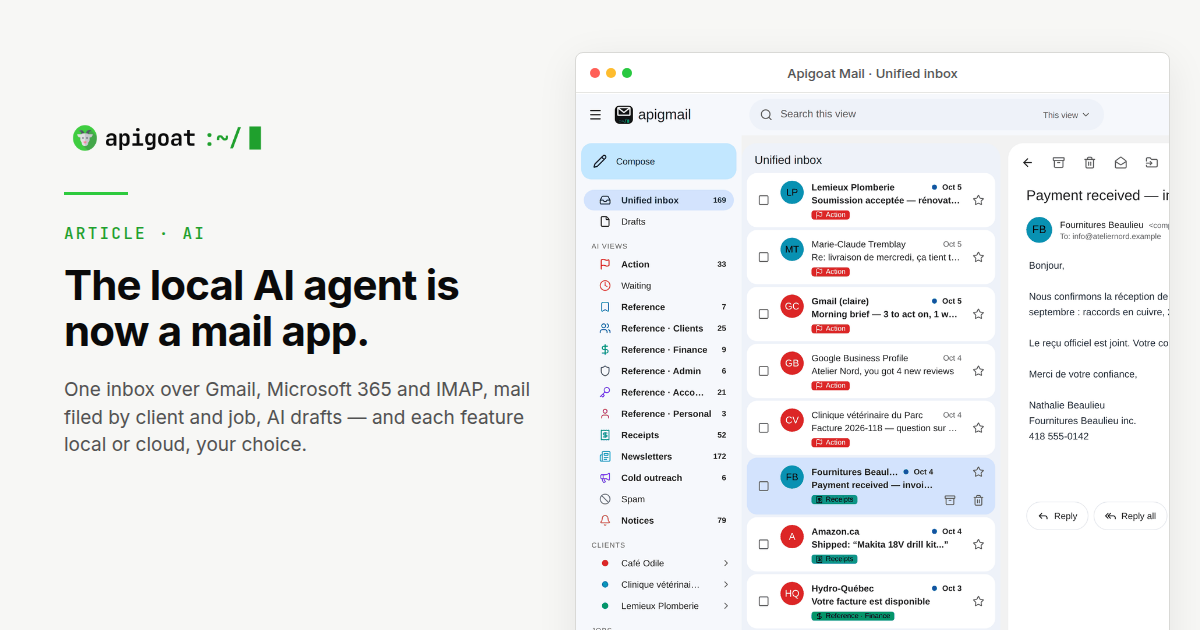
The last update ended with the mail engine done and the app being built. Eight days later the app runs in the browser and on iPhone through Apple's test programme, from one codebase that also builds for Android. This instalment is about what it does, what the release gate kept out on the way, and why the model that reads the mail stays on the machine.
What the gate kept out this month
The sorting itself did not change, and that is the news. Three candidates were measured against the same 206-email set and the same rules — never bin a legitimate email, never miss one that needs a reply, and a floor on how much junk gets caught. Two failed the floor. The third passed it this morning.
| Candidate | Needs a reply, P / R | Junk caught | Outcome |
|---|---|---|---|
| v13, release | 0.93 / 0.95 | 77 % | still the release |
| v14, dates in-pass | 0.96 / 0.90 | 69 % | held back |
| v15, folder list | 0.97 / 0.90 | 73 % | held back |
| v16, folder list, no dates | 0.93 / 0.95 | 77 % | passed, 9 October |
v14 read calendar dates out of the mail in the same pass; v15 listed the company's own folders to the model. Both looked fine on the mail that matters most, and both lost points on junk, under the line. The date reading moved to a separate, on-request step instead, where it cannot touch the sorting. v16 is v15 with the dates taken back out: the company's own folder list, and nothing else added. Measured this morning, it matches the release figure for figure, so the folder list earned its place. The gate is cheap to run and expensive to skip, which is why it exists.
The rest of the run, for the record: 96 of the 101 emails that needed a reply were caught and 7 were flagged that did not need one; 20 of 26 junk emails were binned; the 206 took 17 minutes on the Mac mini, about 1,350 tokens read and 43 written per email. The same numbers as the release, because for a company with every folder v16 is the release, byte for byte.
The same 206 emails, on Claude Sonnet 5.5
The eval runner can now point the same prompt at a cloud model without touching the company's settings. So this morning the 206 emails also went through Claude Sonnet 5.5, with v16 word for word — a prompt written and tuned for the small local model, no adjustment for the big one.
| Measure | Local, Mac mini | Claude Sonnet 5.5 |
|---|---|---|
| Needs a reply, caught | 96 / 101 | 100 / 101 |
| Flagged as needing a reply, did not | 7 | 7 |
| Junk binned | 20 / 26 | 26 / 26 |
| Legitimate emails binned | 0 of 180 | 0 of 180 |
| Valid answers, first try | 206 / 206 | 206 / 206 |
| Calendar events invented | 0 | 0 |
| Wall clock, 206 emails | 17 min, two at a time | 1 min 47 s, four at a time |
| Mail that left the building | none | all 206 |
| Release gate | passed | passed |
Sonnet binned every piece of junk. The Mac mini let six through. Sonnet caught four more of the emails that needed an answer, and missed one. Same seven false alarms, same zero legitimate emails binned, same zero events invented. The batch finished faster, four at a time against two. All 206 left the building.
Both pass the gate. The Mac mini clears the bar this series has used since September, and none of the mail leaves the machine. Sonnet's lead on this set is six junk emails and four replies. The cost of that lead is privacy. Claude read all 206 to get it: every email left the building. On a real inbox, that is every message the sorter touches. Seventeen minutes on a machine bought once keeps them there. The sort stays local because the goal is that Claude never sees the mail.
Two things did ship on the sorting side, without going through the model at all. A layer above it now learns per sender from your corrections — move a sender's mail twice and the third one lands where you put the first two. And a few rules are absolute: a sender you have marked as a client is never filed as junk, whatever the message looks like.
The app, as it stands
A triage agent that only sorts still leaves you in someone else's mail client, looking at its folders. So the project became the client itself. This is what it does today.
- One inbox over every account. Gmail, Microsoft 365 and any IMAP mailbox, every folder synced, and each message stays owned by its own account — a reply goes out from the address it was sent to. Mailboxes can be grouped (personal, a client, a project), and a group carries its own signature and its own standing rules for how replies are written.
- A real mail client first. Sending with a ten-second undo, drafts kept in step with the server so they show up on any device, attachments from files, photos or the camera, formatted signatures, swipes that behave like the phone's own mail app, and an offline queue that replays when the network is back.
- Filed by client and by job. Beyond the thirteen folders, mail now carries a client and a job. The sidebar shows every client with its jobs underneath; moving a message there teaches the agent, so the next email from that sender lands in the right place on its own — and the app proposes the client from the sender when it has never seen one.
- Action is a to-do list. Mail that needs you stays in Action until it is done — closed by hand, by your reply, or by filing it away. Every AI correction can be undone.
- AI reply drafts, never sent on their own. On request, the local model writes a reply from the whole thread, examples of how you write and the group's rules. You edit and send it; it never leaves by itself, and the thread stays on the machine.
- Dates out of the mail — or out of a photo. An Analyse button reads the message and the images in it (a photographed invitation, a scanned notice) and lists the events it finds. One tap adds them to Google Calendar, the phone's calendar or an .ics file.
- Search in plain English. "Invoices from the printer last spring" works across every mailbox without learning a query syntax.
- Triage as an option, folder by folder. Sorting, auto-filing and learning are switched on per company, and for each folder you decide whether the AI may use it and whether the mail moves on the server too.
The mail stays on the machine
Two articles in this series argued for the local model: no mail leaves the building, no monthly bill. That is still the rule. Six features use a model. All six run on the machine. Point one of them at Claude or OpenAI and that feature's text leaves the building. The switch exists so the exception is deliberate. The default is that those companies never see the mail.
NewLocal, unless you send it out. Six features use a model. The one on the machine is the default for every one of them. Point a feature at Claude or OpenAI, on the company's own key, and only that feature's text leaves:
| Feature | What it does | Privacy |
|---|---|---|
| Sorting | Which folder, does it need a reply, how urgent. | Stays local. Every email would leave the building to be read by Claude or OpenAI, and nobody is waiting on a sort. A queue on the Mac mini is fast enough. |
| Client and job | Which client and which piece of work an email belongs to. | Stays local. Same reason: every email would be read outside the building, and nobody is waiting. |
| Reply drafts | A draft written on request from the thread, your style and the group's rules. | Stays local. The thread is the mail. Sending it to Claude or OpenAI means they read the conversation. The switch is there for one draft; the default is off. |
| Search | Turns a plain-English question into a search across your mailboxes. | Stays local. A question like "invoices from the printer" already names a client. In the cloud, that question leaves. The mail itself is matched by vectors computed on the machine and is not sent. The question is still a leak. |
| Analyse | Dates and events from a message and its images; in the cloud it also reads the text in a photo. | Stays local for the dates. The cloud path also reads the text in a photo, and then the message and the images leave. A scanned notice or a receipt is the part you least want read somewhere else. |
| Morning brief | The short summary of what came in and what needs you, at the start of the day. | Stays local. The summary is the day's mail in short form. Sending it out once a day still sends the day. |
Four presets set all six at once — local only, economy, balanced, quality — and any one feature can be changed on its own. Quality, here, means more of the text goes to Claude or OpenAI. If the cloud is unreachable, the local model takes over. The setting that matches this series is local only. The others are you deciding which text leaves.
Nothing in this article measures a better reply. What it measures is sorting, and the Mac mini passed the same gate without the mail leaving. Pointing a feature at Claude or OpenAI means that company reads the text. The default stays on the machine so that happens only when you mean it to.
What comes next
Triage performance keeps improving the same way it has since September: corrections, rules, the gate. The next features are about what a job can do once its mail is sorted. A job is a client plus a piece of work, and the agent already knows which emails belong to it. The next step is letting it act on them, on request. The model that decides stays on the machine. Filing a document to Drive or writing a QuickBooks entry sends that document to a system you already use, and only when you approve it.
- Files to where the job lives. An attachment or a draft filed to the job's folder on Google Drive, SharePoint or OneDrive, under the client and the job, named the way you name things.
- Accounting entries. A receipt or a supplier invoice in the Receipts folder turned into a QuickBooks entry against the right client and job, ready for you to approve.
- Calendar writes. The dates Analyse already reads out of a message or a photo written straight into the job's calendar, not only yours.
- Any tool, through MCP. The Model Context Protocol is the open standard for connecting an AI to tools. Through it the agent can reach the systems a business already runs — a CRM, a ticketing tool, our own accounting app — without each one being wired in by hand.
What this means for an SME
Three weeks from a build log to a product, and the part that made it possible was the boring part: a measurement that could say no. Every feature above sits on a sorting engine that has been tested the same way since September and has still never binned a real email. Once that was dependable, the app could grow around it quickly, because nothing it added could quietly make the sorting worse without the gate saying so.
That is the part worth paying for. The machine is cheap, the model is free, and the correspondence stays in the building. Making them dependable enough to trust with your inbox is the work.